Nepal FlagOfficial .np FormatUpdated for 2026 Rules

NP Cover Letter Generator for .com.np Domain Registration

Create a free register.com.np request letter for .com.np, .org.np, .net.np, .info.np and .name.np domains. Download a print-ready PDF with nameservers, applicant details and the required submission format.

Cover Letter Generation

Format Verified

Mercantile Ready

Registry fee

.NP registration is free

Review time

Usually 3-4 business days

Works for

.com.np, .org.np, .net.np, .name.np

Output

Preview, copy, print, PDF

Letter Details

Enter exactly what appears on your official documents to prevent rejection.

Built for register.com.np submission. Supports personal and business requests, letterhead/stamp requirements, nameservers, PDF download and print-ready formatting.

Document Preview

Review your generated letter below.

No Preview Available

Fill out the form on the left and click "Generate Cover Letter" to see your printable document here.

Official Checklist

Official register.com.np submission checklist

The .np registry strictly enforces these rules. Your cover letter is just one part; ensure your attached documents match exactly.

Personal Domains

  • Exact applicant name must match documents.
  • Personal domains need citizenship/passport or accepted identity document.

Business Domains

  • Domain must match personal name or registered organization name.
  • Business domains need company registration, letterhead, stamp, and authorized signature.

Technical & Uploads

  • Valid nameservers required before submission.
  • Cover letter must be signed before upload.

Registration Guide

How .np domain registration works in Nepal

People searching for an NP cover letter usually need more than a letter. They need to know whether the domain name is eligible, which extension to select, what documents to upload, and why the registry may reject the request.

What makes a .np cover letter acceptable?

A good .np domain cover letter is short, formal, and consistent with the documents uploaded on register.com.np. The hostmaster should be able to verify three things quickly: who is applying, which domain is being requested, and whether the requested name is connected to the applicant.

For personal .com.np requests, the safest domain is based on the exact name shown on citizenship, passport, driving license, voter card, NRN ID, or eligible resident visa. For business and organization requests, the domain should connect to the registered company name, organization name, product, service, brand, or trademark.

The cover letter should also include valid primary and secondary nameservers. The registry can reject DNS details when only an IP address is provided, so use nameserver hostnames from your hosting provider.
Extension Match

Which .np extension should you select?

Choosing the wrong second-level extension is one of the fastest ways to create confusion. Match the extension to the applicant type and supporting documents.

Extension
Typical use
Best-fit applicant
.com.np
Commercial or general use
Individuals, businesses, brands, products, and services when the name matches the supporting document.
.org.np
Organizations
Non-profits, associations, NGOs, and organizations with matching registration documents.
.edu.np
Education
Schools, colleges, universities, academies, and education institutions with official proof.
.net.np
Network or portal use
Network services, portals, and technical projects with a name connected to the applicant.
.name.np
Personal names
Individuals registering a domain based on their documented personal name.
.info.np
Information sites
Informational websites where the name is connected to the applicant, brand, or service.

Submit Correctly

Step-by-step: from cover letter to register.com.np submission

Use this workflow after generating your cover letter. It targets searches like how to register .com.np domain, register.com.np cover letter, and NP domain registration process.

1

Search domain availability

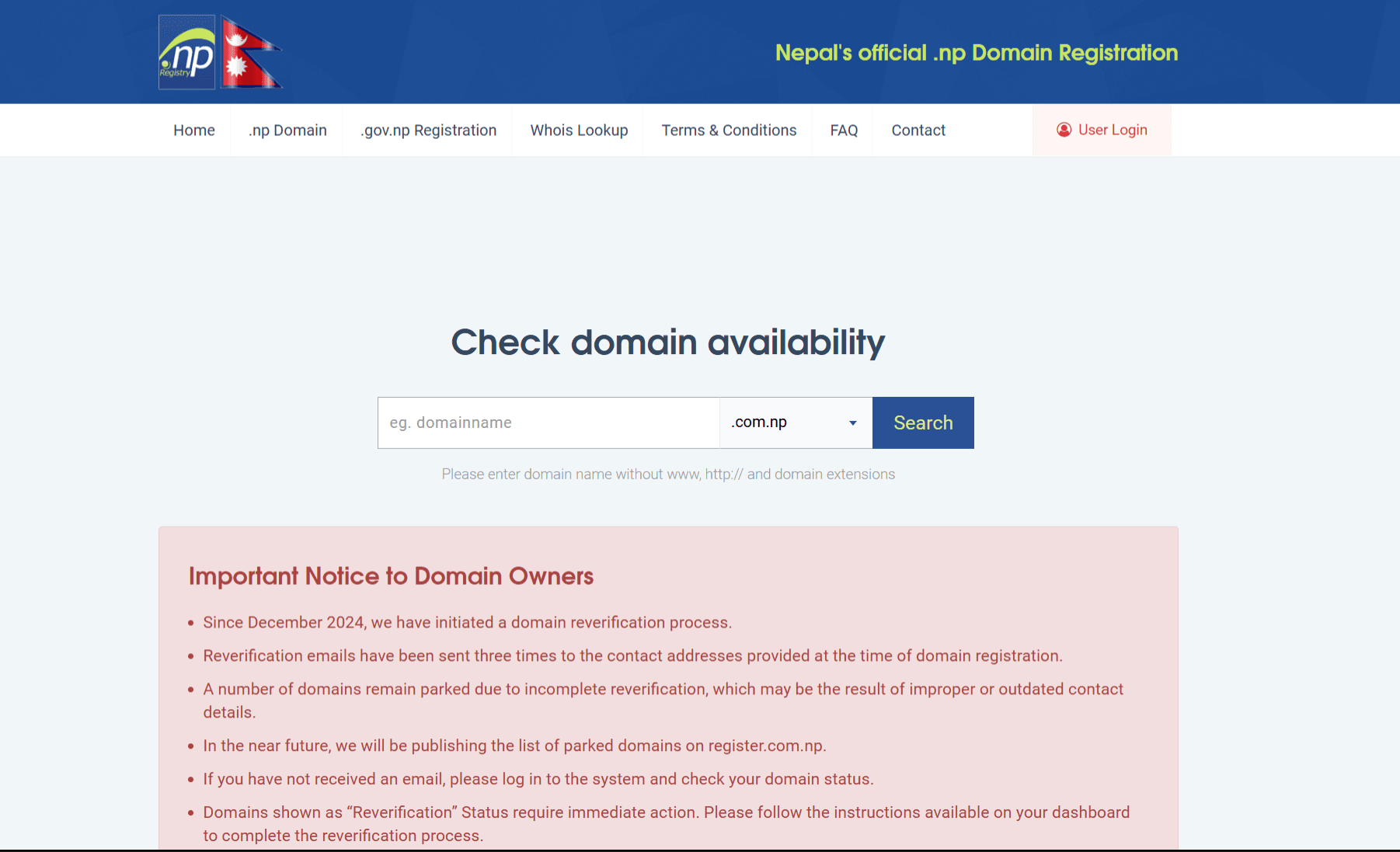
Go to register.com.np, enter the domain without www, https, or extension, then choose the correct .np extension.

2

Create or log in to account

Use an email address you control because registry updates and correction requests are sent there.

3

Fill applicant contacts

Add accurate administrative and technical contact details. The admin contact should be the actual owner.

4

Add nameservers

Enter valid nameserver hostnames from your hosting provider, for example ns101.bisuphost.com and ns102.bisuphost.com.

5

Upload documents

Upload the signed cover letter plus citizenship or company/organization documents in accepted image formats within the file-size limit.

6

Wait and monitor status

Approval normally takes several business days, but can take longer when the registry has backlog or asks for correction.

register.com.np website dashboard for .np domain registration and document upload
Use the official register.com.np portal to search your .np domain, enter nameservers, and upload the signed cover letter with citizenship or company documents.

Sample Format

Copy-paste NP domain cover letter sample

Some users prefer to copy a manual format instead of using the generator. This sample gives Google and users a clear answer for NP domain cover letter sample, .com.np cover letter format, and Mercantile request letter searches.

Date: [Month Day, Year]

To,
The Hostmaster,
Mercantile Communication Pvt. Ltd.
Hiti Pokhari, Durbar Marg,
Kathmandu, Nepal

Subject: Application for .np Domain Registration

Dear Sir/Madam,

I would like to request registration of the domain name [yourname.com.np].
I have attached the required identity document with this application for verification.

Domain Name: [yourname.com.np]
Primary Name Server: [ns1.example.com]
Secondary Name Server: [ns2.example.com]

Kindly consider my application for .np domain registration.

Sincerely,
[Your Full Name]
[Your Address]

Common Reasons for Rejection

Avoid these frequent mistakes to ensure your domain gets approved quickly.

01

Domain name mismatch

The requested domain is not an exact match or close connection to the applicant name, company, product, or brand.

02

Invalid nameservers

The application uses only an IP address instead of valid nameservers like ns1.example.com and ns2.example.com.

03

Missing signature

The cover letter is not signed before uploading to the registry.

04

Missing company stamp

Business requests lack an official stamp or letterhead in the request document.

05

Blurry documents

The identity document, citizenship, or company registration scan is unreadable or cropped.

06

Wrong extension selected

Using extensions like .edu.np without being an educational institution or .org.np without organization proof.

07

Generic domain request

Requesting dictionary words or generic terms not directly related to the applicant name or brand.

Frequently Asked Questions

Everything you need to know about .np domain cover letters.

Need hosting after approval?

Your .np domain is free, but you'll need web hosting to put your website online. Our servers are perfectly optimized for Nepal.

View Hosting Plans

What is an NP domain cover letter?

An NP domain cover letter is a formal request letter submitted with a .np domain application. It identifies the applicant, requested domain, nameservers, and the reason the applicant has the right to request that domain.

Can I use this for .com.np domain registration?

Yes. This tool is built for .com.np cover letters and also works for common .np extensions such as .org.np, .net.np, .info.np, and .name.np when your documents match the requested domain.

Is .np domain registration free in Nepal?

Yes. The official .np registry states that domain registration under .NP ccTLD is free of cost. You still need valid documents, matching applicant details, nameservers, and a request letter.

How long does .np domain approval take?

The official FAQ says .np registration usually takes 3 to 4 business days or more depending on backlog, because submitted documents must be verified and authenticated.

Do businesses need a stamp and letterhead?

For company or organization requests, the official registry lists request letter, company registration document, letterhead, stamp, and authorized signature as important approval requirements.

What documents are required for a personal .com.np domain?

For personal requests, the domain should be based only on the applicant name shown in documents such as Nepalese citizenship, passport, driving license, voter card, NRN ID, or Nepalese resident visa for foreign nationals.

Why do .np domain requests get rejected?

Common rejection reasons include missing applicant details, unreadable documents, missing identity documents, domain-name mismatch, invalid DNS configuration, wrong extension selection, or missing company letterhead, stamp, and signature.

Where do I submit the generated .np cover letter?

Submit the signed cover letter on register.com.np with your identity or company documents after checking domain availability and filling the registration form.